
The CRM we would use daily, built by the agency that uses it.
Marketing CRM is Avangard’s internal product: a multi-tenant, AI-powered CRM for digital agencies with explainable lead scoring, three-language support, and a design system that ships features in hours instead of days. We dogfood it on real deals — this is the decision record behind it.
An internal product, published as a portfolio piece.
Agencies run on spreadsheets, Notion, or generic CRMs that force rigid pipelines and treat AI as a bolt-on chatbot. Marketing CRM is our answer: opinionated agency pipelines, AI as core infrastructure, multi-tenancy from day one — and zero-config onboarding that delivers first value in minutes.
Status: private beta (pre-launch), roughly six months of development. Because the product has not launched, this page publishes the build record and beta targets — not results. Numbers arrive in a stamped update once post-launch data exists.
Generic CRMs do not match how agencies sell.
We audited how agency pipelines actually work and found four recurring gaps in off-the-shelf tools. Our angle was simple: build the CRM we would use daily at Avangard.
The gap
- Rigid pipelines that do not match agency sales cycles.
- AI treated as a bolt-on chatbot, not a decision layer.
- No multi-tenant workspace isolation for agency-to-client separation.
- Weeks of setup before the first moment of value.
Our angle
- Opinionated defaults for agency pipelines: New → Qualified → Proposal → Won/Lost.
- AI as core infrastructure — every lead gets scored, explained, and actioned automatically.
- Multi-tenant from day one — workspace isolation, RBAC, invite flows.
- Zero-config onboarding — CSV import, Gmail sync, and public capture forms in minutes.
Next.js 16 on serverless Postgres, AI behind a resilient dual provider.
React Server Components by default with explicit client boundaries, Neon serverless Postgres through Prisma, JWT auth with a workspace RBAC layer, and every AI call logged for cost and latency observability.
Next.js 16 (App Router)
  RSC/SSR Pages · Client Components · API Routes (/api/ai, /api/auth)
        │                │                    │
   Prisma 7 + Neon   NextAuth v5 (JWT)   next-intl v4 (i18n)
        │
PostgreSQL (Neon serverless)| Layer | Choice | Rationale |
|---|---|---|
| Framework | Next.js 16 + React 19 | RSC by default, streaming, Turbopack, React 19 compat |
| Database | Prisma 7 + adapter-pg | Neon serverless requires connection pooling via driverAdapters |
| Auth | NextAuth v5 beta (JWT + PrismaAdapter) | Credentials provider (bcrypt), OAuth-ready, multi-tenant session |
| Multi-tenancy | Workspace / WorkspaceMember + RBAC | Single workspace per instance; ADMIN / MEMBER / VIEWER roles |
| AI | Dual-provider: Groq → Gemini fallback | Cost and latency optimization with resilience and streaming |
| i18n | next-intl v4, cookie-based locale | 3 locales (EN/TR/ES), no URL prefix, middleware locale header |
| Observability | Custom logger + AI call logging | Every AI call logged: tokens, latency, provider, outcome |
Database schema highlights
- User & Auth: User, Account, Session, VerificationToken (NextAuth-compatible).
- Workspace: Workspace, WorkspaceMember (multi-tenant isolation).
- Core CRM: Lead, Client, Contact, Activity, Note, Tag.
- Pipeline: PipelineStage, Deal, Proposal, Task.
- AI & Automation: Automation, Sequence, ScoringRule, AIUsageLog.
- Integrations: Webhook, GmailSync, GoogleCalendar.
- Analytics: Report, SavedView, CustomField.
API surface
/api/auth/[...nextauth]    → NextAuth v5 handlers
/api/ai/analyze-stream     → Streaming lead analysis (SSE)
/api/ai/deep-analysis      → Full structured analysis
/api/ai/generate-sequence  → AI email sequence generation
/api/ai/suggestions        → Real-time AI recommendations
/api/cron/*                → Scheduled jobs (digest, sequences, automations)
/api/integrations/google/* → OAuth connect / disconnect / status
/api/track/*               → Email open / click tracking
/api/upload-*              → Image / PDF upload with validation
One component library, two scoped themes.
The dashboard needs information density and neutral chrome; the landing page needs emotional resonance and brand personality. Both ship from 40+ customized shadcn/ui components on Radix primitives — scoped by a single theme class so the two never leak into each other.
Component foundation
- Library: shadcn/ui (New York style, stone base, CSS variables) on Radix UI primitives.
- Icons: Lucide React. Forms: react-hook-form + Zod validation.
- Rich text: Tiptap (color, font-family, image, link, text-align).
Custom design tokens (OKLCH)
:root {
  --background: oklch(1 0 0);
  --foreground: oklch(0.147 0.004 49.25);
  --primary: oklch(0.216 0.006 56.043);
  --radius: 0.625rem;
}
.landing-theme {
  --canvas: oklch(0.977 0.008 95);
  --bark: oklch(0.245 0.018 75);
  --moss: oklch(0.545 0.075 155);
  --clay: oklch(0.63 0.098 55);
}| Role | Font | Notes |
|---|---|---|
| UI Sans | Geist Sans | Dashboard and interface text |
| UI Mono | Geist Mono | Data, code, labels |
| Display | Fraunces (variable) | Landing headings — editorial warmth |
Motion & interaction
- Scroll reveals (520ms ease-out), hover-pause marquee, slow aura drift on the hero.
- Pipeline preview with a scroll-linked 3D transform for a “live product” feel.
- Every animation disabled under prefers-reduced-motion.
Accessibility
- Radix primitives carry ARIA patterns; focus-visible rings on all interactive elements.
- Semantic landmarks, headings, and lists; keyboard navigation throughout.
- WCAG AA contrast verified in both themes.
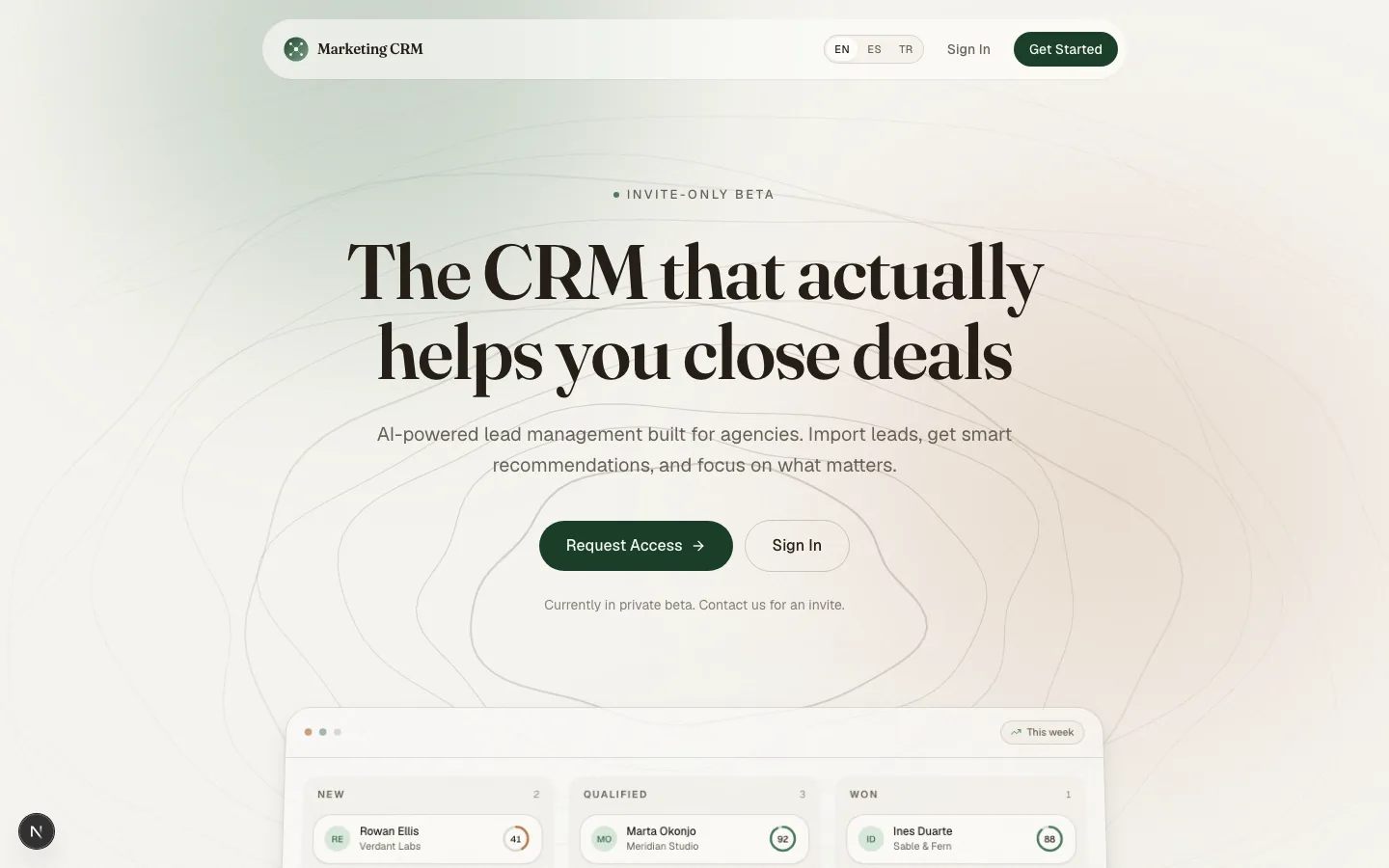
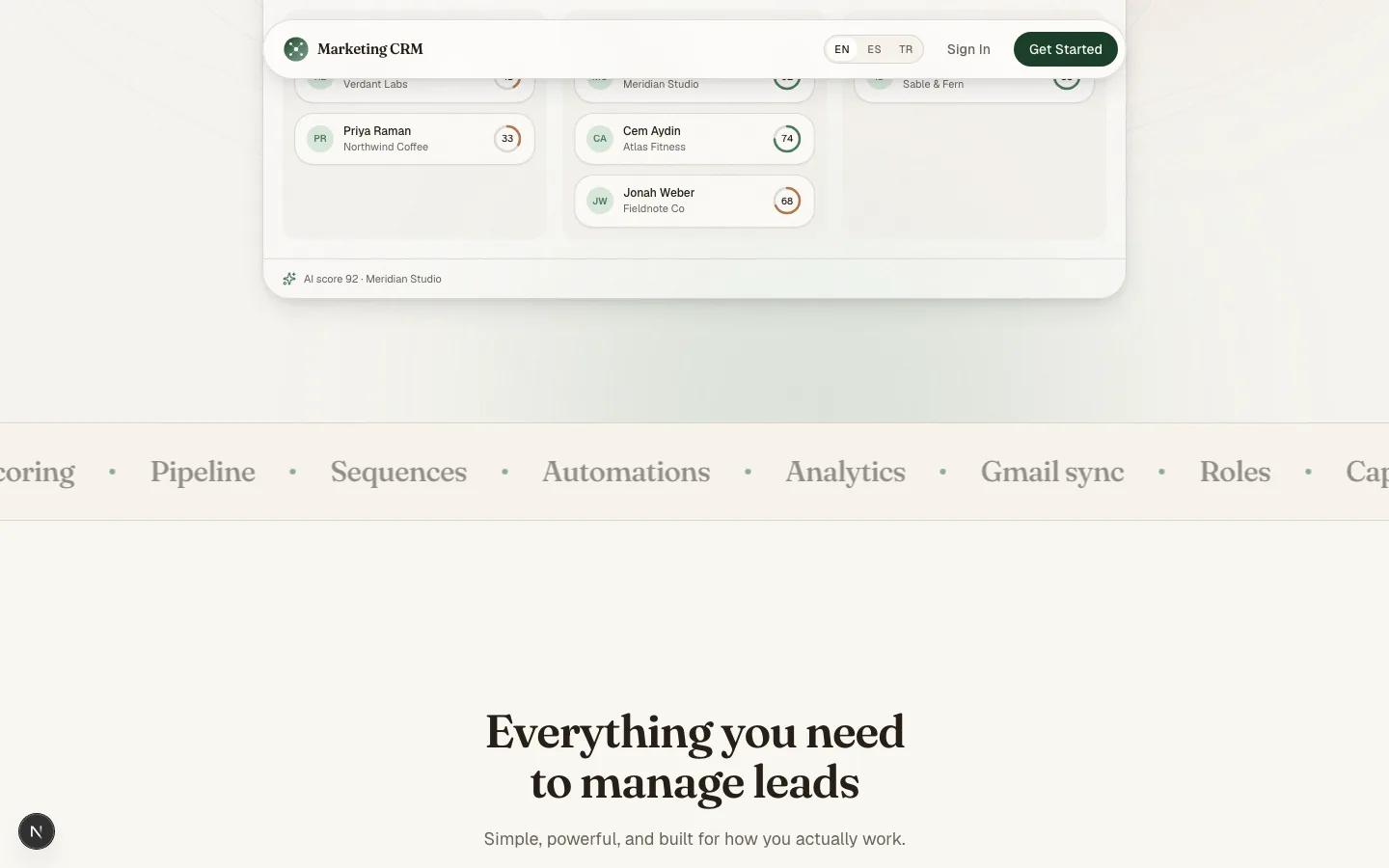
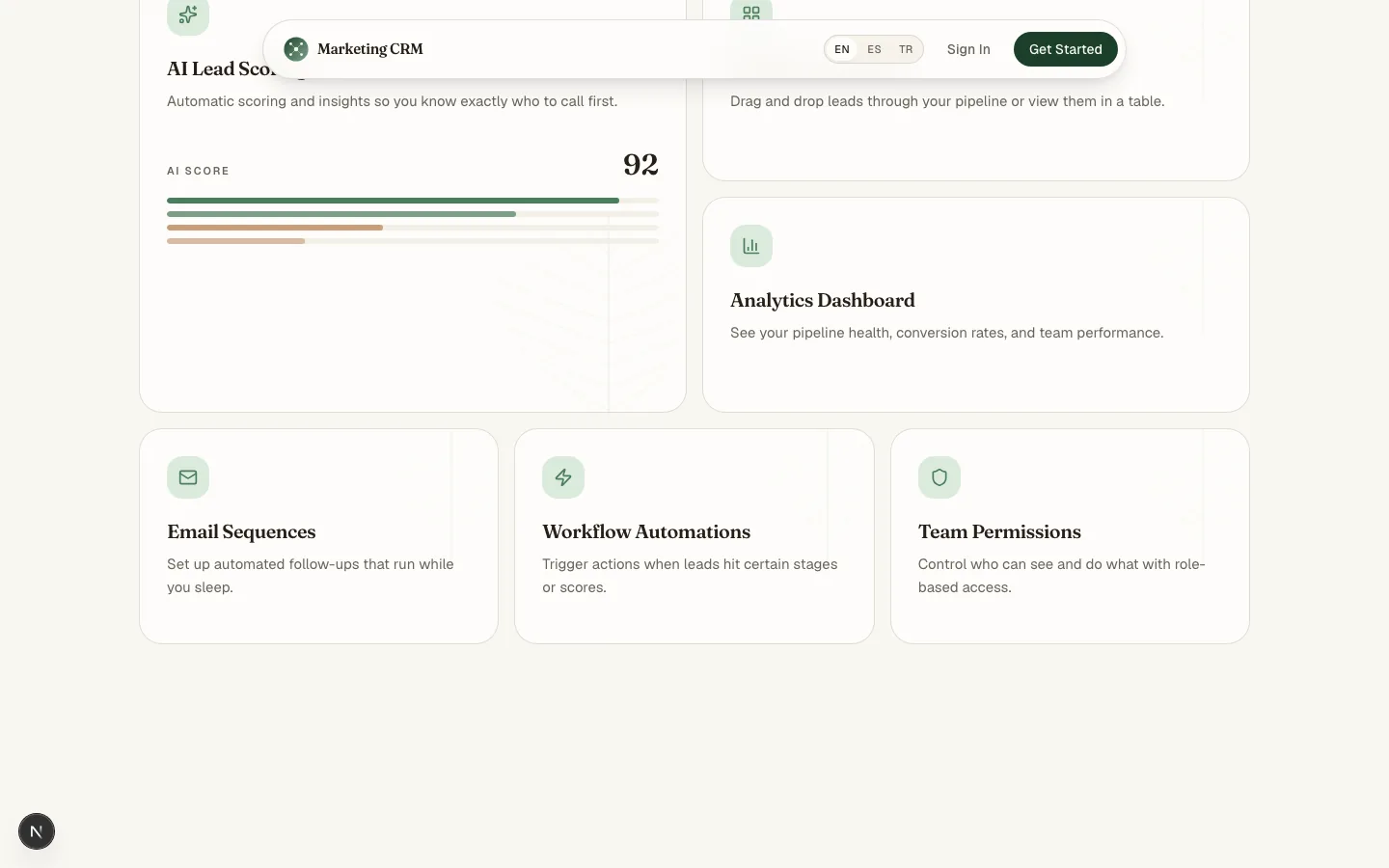
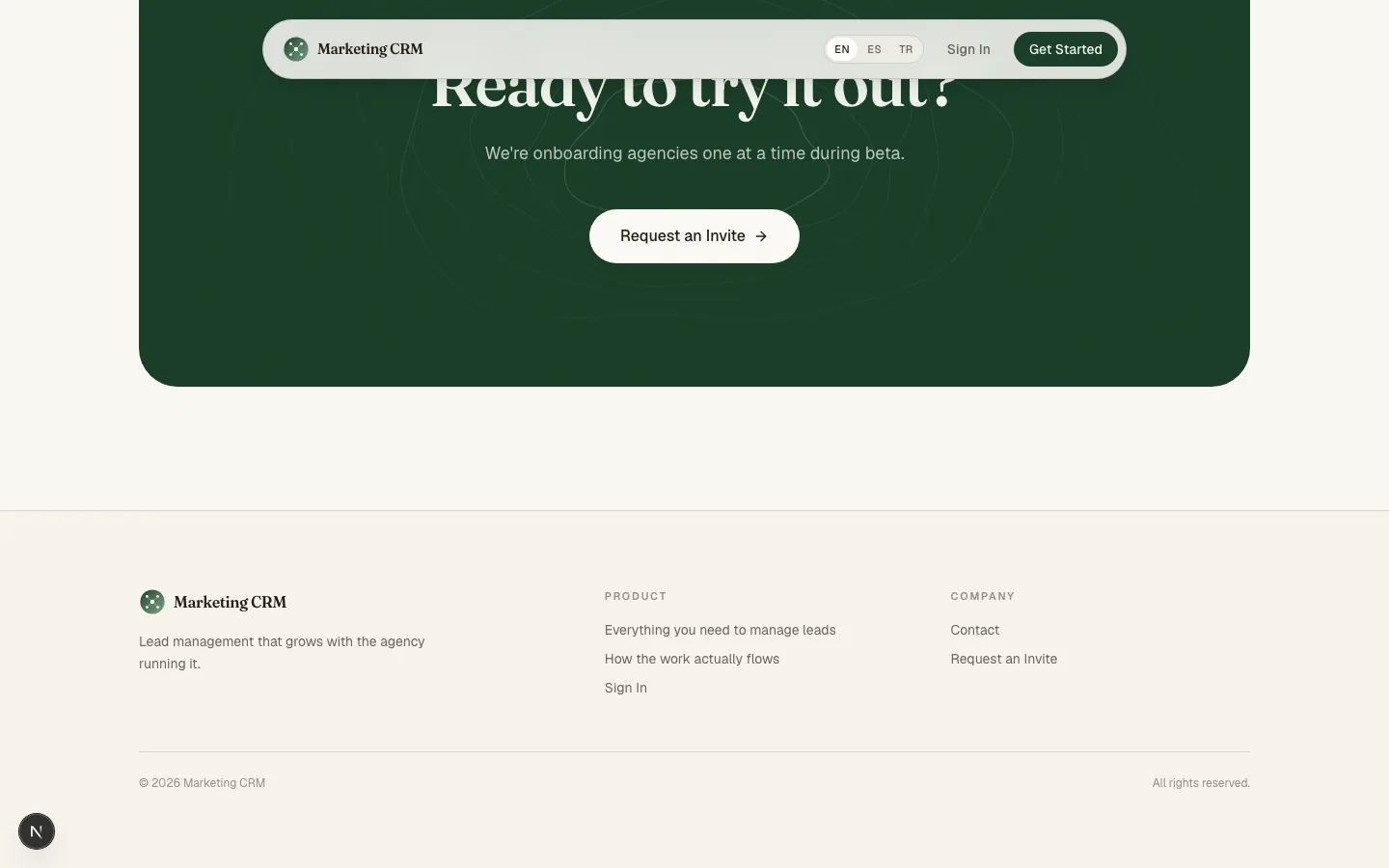
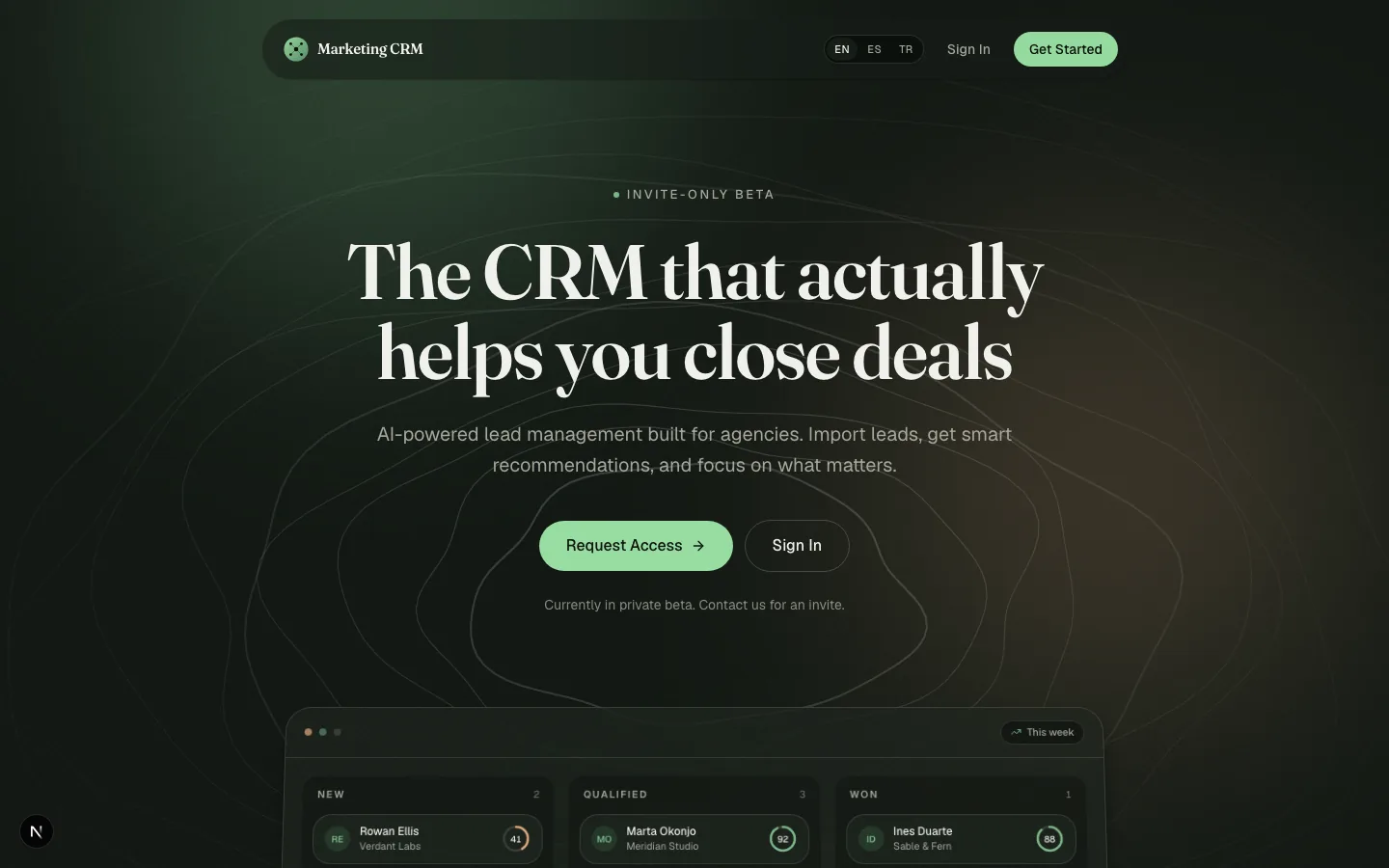
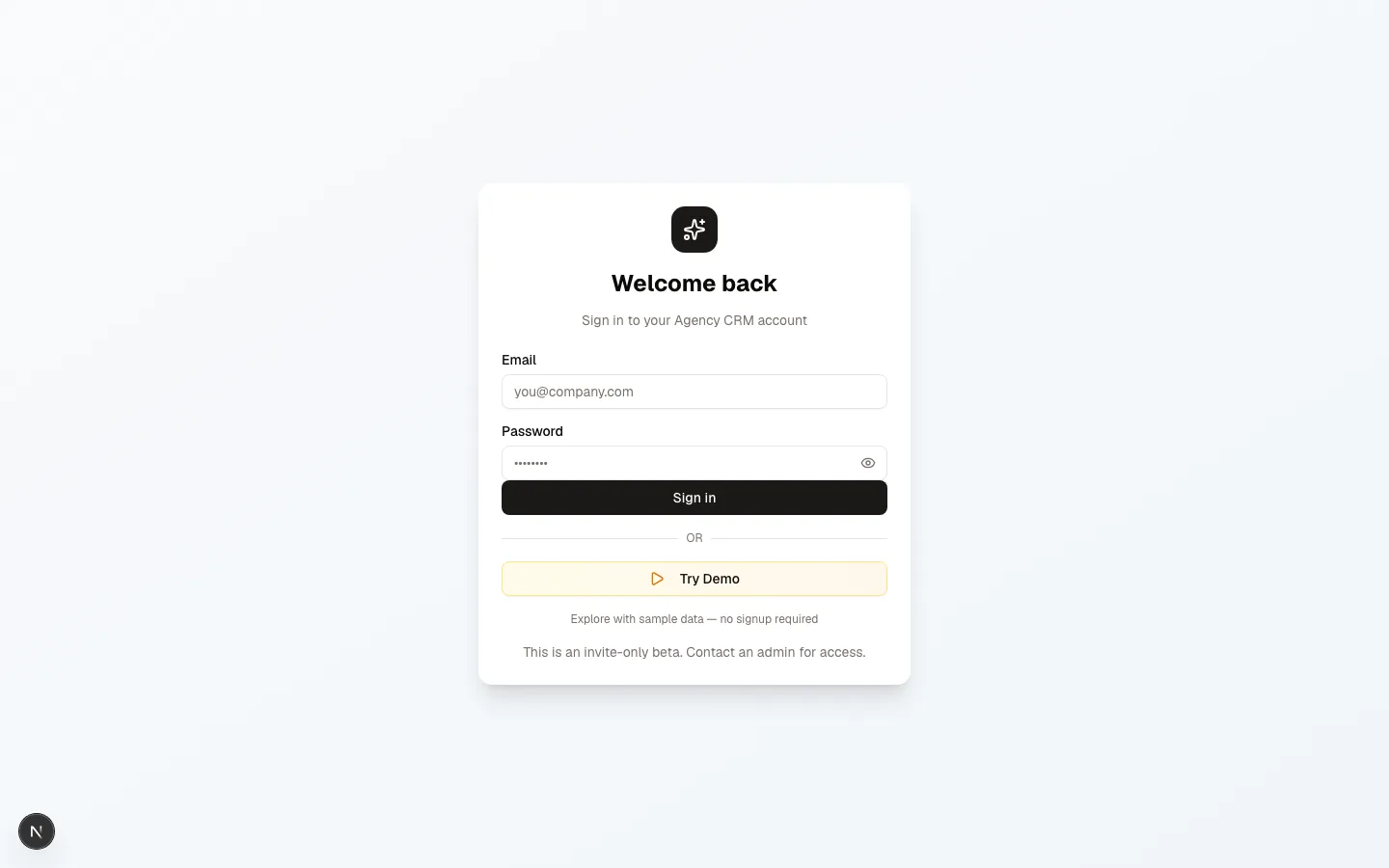
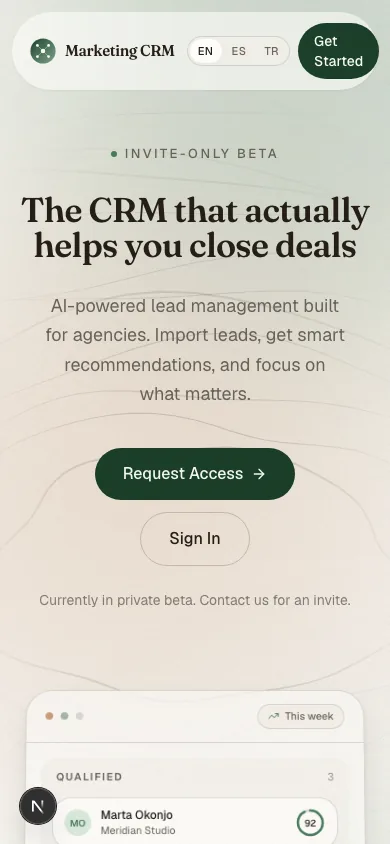
Landing, login, and mobile — the product as shipped to beta.
Seven captures from the staging build: the landing funnel, the dark-mode hero, the login gate, and the responsive mobile view.
A gated beta funnel on the landing page, activation inside the dashboard.
Anonymous visitors flow toward a beta request; signed-in users meet an onboarding checklist, a command palette, and empty states that each point at one guided action.
| Element | Purpose | Decision |
|---|---|---|
| Hero | Value prop + interactive proof | Pipeline preview renders the real component with a scroll-linked 3D transform |
| Primary CTA | “Request Access” via LinkedIn DM | Filters for agency decision-makers; manual qualification before invite |
| Secondary CTA | “Sign In” | Existing users bypass the gate |
| Marquee | Feature density without scrolling | 8 chips, infinite loop, hover-pause |
| Manifesto | Emotional positioning | “Software should feel like tending a garden, not fighting a spreadsheet” |
| Process stack | How it works in 3 steps | Import → Score → Automate |
| Closing CTA | Final conversion push | Same LinkedIn gate |
No email capture on the landing page — intentional. A LinkedIn DM qualifies high-touch beta users far better than a form fill and keeps tire-kickers out of the funnel.
| Pattern | Implementation | Conversion impact |
|---|---|---|
| Onboarding checklist | 4 steps: import, connect Gmail, create pipeline, invite team | Progressive disclosure; completion means activation |
| Command palette (⌘K) | Global search plus actions | Power-user retention; shorter time-to-action |
| Keyboard shortcuts | Provider plus help modal (?) | Discoverability without UI clutter |
| Empty states | Illustrated with guided buttons | “Import CSV” / “Add Lead” / “Connect Gmail” |
| AI insights panel | Explainable scoring with next actions | Trust → reliance → habit formation |
Three locales, cookie-based, with per-page metadata.
English (default), Turkish, and Spanish share full message parity — landing copy, dashboard strings, and even AI analysis prompts, which adapt to each lead’s preferred language.
i18n architecture
Middleware (cookie → locale)
      → next-intl request (static message imports)
      → Layout (NextIntlClientProvider)
      → Pages (useTranslations, useFormatter)
Locale detection order
- NEXT_LOCALE cookie (1-year max-age).
- Accept-Language header (fallback).
- Default: English.
No URL prefix (/en/dashboard, /tr/dashboard) — cleaner UX and simpler middleware, at the cost of direct locale deep links; shared links carry a ?lang= parameter.
| Feature | Status |
|---|---|
| Dynamic metadata per page | generateMetadata in each route |
| Open Graph / Twitter cards | Configured in layout plus page metadata |
| Structured data (JSON-LD) | SaaS product schema on landing; WebApplication on dashboard |
| hreflang | Locale header plus alternate links in <head> |
| robots.txt | Allow all; disallow /api/ and /dashboard/ |
| Core Web Vitals | Package-import optimization, font display: swap |
Performance budgets
- LCP under 2.5s (hero image plus pipeline preview).
- CLS under 0.1 (font swap, reserved space for dynamic content).
- INP under 200ms (RSC by default, minimal client JS).
AI as infrastructure, not a feature tab.
Scoring, insights, and sequences all share one pipeline: a cheap fast primary provider with a stronger fallback, exponential-backoff retries, structured Zod-validated output, and usage logging on every call.
User request → Groq (primary, llama-3.1)
                    → Gemini (fallback, gemini-1.5)
      Exponential backoff (max 3 attempts)
      Structured output (Zod) → Usage logging (every call)
Lead analysis output — TypeScript interface (abbreviated)
interface LeadAnalysis {
  score: number;                    // 0–100
  confidence: number;               // 0–1
  scoreBreakdown: ScoreFactor[];    // explainable: factor, weight, evidence
  executiveSummary: string;
  bestServiceMatch: ServiceType;
  conversationStarters: string[];
  recommendedActions: Action[];
  nextBestAction: { action, reasoning, urgency };
  outreachStrategy: { channel, multiTouchPlan[], toneGuidance };
  dealStrategy: { positioning, stakeholders, competitiveAngle };
  potentialObjections: { objection, response, proofPoint }[];
  dealRisks: { risk, severity, mitigation }[];
  outreachEmail: { subject, body, followUp };
  proposalGuidance: { angle, deliverables, successMetrics, riskReversal };
}| Feature | Implementation |
|---|---|
| Streaming analysis | SSE endpoint with token-by-token UI updates |
| Explainable scoring | Score breakdown rendered per lead |
| Multi-language prompts | Analysis language follows the lead’s preferred language |
| Workspace feedback loop | Human corrections (thumbs up/down) feed back into prompts |
| Usage dashboard | /dashboard/ai — tokens, cost, success rate, latency per provider |
| Sequence generation | Full email sequences from a brief: subjects, body, timing |
Cost control
- Groq around $0.0001 per 1K tokens (primary); Gemini around $0.001 per 1K (fallback).
- Token caps: 4096 for analysis, 2048 for recommendations.
- Identical prompts deduplicated per session.
Dense where it counts, guided everywhere else.
Collapsible role-filtered sidebar, workspace switcher with notifications, bottom-tab navigation on mobile — and seven core views that share one interaction grammar.
| View | Key components | UX patterns |
|---|---|---|
| Leads | Table plus Kanban toggle, saved views, bulk actions, CSV import/export | Drag-and-drop, virtualized rows, column visibility |
| Lead detail | Overview, timeline, emails, proposals, documents, AI insights | Tabbed, sticky header, palette actions |
| Analytics | 15+ charts, date-range picker, report builder | Tabs: pipeline, team, sequences, email, revenue |
| Sequences | Visual builder with condition evaluator | Node-style flow plus step-by-step wizard |
| Automations | Trigger → condition → action cards | Card-based, test mode, execution log |
| Inbox | Unified Gmail sync, thread view, AI draft assist | Split view, keyboard shortcuts (j/k, r, a) |
| Settings | Users (RBAC), webhooks, integrations, workspace | Sectioned, inline validation |
Power-user features
- Command palette (⌘K): fuzzy search across leads, clients, tasks, and actions.
- Global keyboard shortcuts: go-to-dashboard, go-to-leads, new lead, search.
- Saved views: per-user, shareable, with filter, sort, and column config.
- Bulk actions: multi-select to assign, change stage, tag, export, or delete.
Every shortcut was priced before it was taken.
Eight calls that shaped the build — each with the cost we accepted.
| Decision | Trade-off | Why we chose it |
|---|---|---|
| Cookie-based locale, no URL prefix | No direct locale deep links | Cleaner UX; middleware covers nearly all cases; shared links use ?lang= |
| Prisma driverAdapters (preview) | Bleeding edge, possible breaking changes | Neon serverless requires connection pooling — no alternative |
| NextAuth v5 beta | API instability, sparse docs | JWT strategy plus PrismaAdapter is the modern path; v4 is legacy |
| Dual AI providers | Double the integration surface | Groq is far cheaper and faster; Gemini reasons better; fallback means resilience |
| shadcn/ui plus custom tokens | Maintenance burden versus a UI kit | Full design ownership, no vendor lock-in, tokens portable to Figma |
| RSC by default, client opt-in | Learning curve for the team | Performance by default; client boundaries explicit via “use client” |
| Single workspace per instance | No multi-workspace per user | Simpler mental model: one agency, one workspace; multi-org means separate deployments |
| No email capture on landing | Fewer top-of-funnel leads | LinkedIn DM qualifies far better for a high-touch beta; avoids tire-kickers |
Targets for the beta — not results.
The product has not launched, so there is nothing honest to report yet. Below is the AARRR framework and the technical health bar the beta will be judged against.
| Stage | Metric | Beta target |
|---|---|---|
| Acquisition | Beta requests / month | 50 |
| Acquisition | LinkedIn DM → invite sent | > 60% |
| Activation | Onboarding checklist completion | > 70% |
| Activation | First lead imported (day 1) | > 80% |
| Activation | Gmail connected (day 3) | > 50% |
| Retention | DAU / MAU (week 4) | > 40% |
| Retention | Feature adoption: AI scoring | > 60% |
| Retention | Feature adoption: sequences | > 30% |
| Revenue | MRR (post-launch) | $5k/mo by month 3 |
| Revenue | Expansion (seats) | > 20% month-over-month |
| Referral | Invites sent per user | > 1.5 |
| Referral | Invite → activated | > 40% |
| Metric | Target |
|---|---|
| p95 API latency | < 500ms |
| AI analysis latency (p95) | < 8s |
| Error rate (5xx) | < 0.1% |
| AI cost per lead analyzed | < $0.02 |
| Build time (CI) | < 5 min |
Dogfooding paid for itself; prompts need their own package.
The Avangard team runs real deals through the product, so the feedback loop is instant. The design-system investment means new pages ship in hours — while AI prompts, E2E coverage, and a public API all arrived later than they should have.
What worked
- Dogfooding from day one — real deals, instant feedback loop.
- AI as infrastructure, not a feature — scoring, insights, and sequences share one pipeline.
- Design-system investment — customized components mean new pages ship in hours, not days.
- Multi-tenancy from the start — zero migration pain; isolation baked into every query.
- Built-in observability — AI call logging caught provider rate limits before users noticed.
What we would do differently
- Add sitemap generation earlier — dynamic routes need manual config; SEO readiness lagged.
- Extract AI prompts into a versioned package — 2,000+ lines of prompts with manual versioning hurts.
- Invest in E2E coverage sooner — late Playwright tests meant flaky CI.
- Sync design tokens to Figma — CSS-side tokens drift from designer files.
- Ship a public API from day one — late webhooks would have shaped the data model.
Agency value delivered
Beyond an internal tool, the build compounds across the agency — and the same thinking powers our client work on AI automations, conversion optimization and technical SEO work for clients.
- Portfolio piece: full-stack, AI, i18n, design systems, and CRO in one demonstrator.
- Internal tool: Avangard runs on it — real revenue impact.
- Recruiting signal: engineers want to work on this stack.
- Client conversations: “we built this” beats “we know Next.js”.
See the staging build
The beta is private, but the staging deployment shows the landing funnel this page describes. For questions about the build, reach out on LinkedIn. LinkedIn.
Open the staging site